Certificate and Transcripts
About your certificate and transcripts
A degree certificate is the official award document, confirming your degree.
A transcript lists the titles, grades and credit values of the modules you studied and successfully completed in each academic year.
Certificates and transcripts are always posted together. The transcript has a link to the online Diploma Supplement.
Requesting your certificate and transcript
– For students awarded 22 July 2026 onwards
Your certificate and transcript can be found on our award and verifications portal. Here you can:
- view and access secure electronic award documents
- order hard copies of award documents
- share your electronic award documents with third parties
You will receive an email once your documents have been published to the portal. You then need to register to access. To do this you need:
- First name. As registered during your time of study.
- Surname. As registered during your time of study.
- Your date of birth
- Your Student ID Number
- Your personal email address
If you cannot remember your information, we suggest you enter the details that you can recall, and we’ll be notified to check the data. We may have to contact you for further information to ensure that we are granting access to the correct person.
Once registered, we will verify your details and send you a confirmation once your access to the portal is granted.
You can register on our Award and Verification Portal.
Important – Please do not register until you have received an email advising you to do so. If you try to do this before receiving your email, your registration will fail.
Fees
Please note – From 25 November 2026, the following fees will apply to all students awarded from 22 July 2026 onwards:
- Electronic copy of certificate and transcript: Free of charge
- Original printed certificate: Free of charge
- Original printed transcript: £30
- Replacement certificate or transcript (where original printed copies have been lost): £30 per document
- Third-party verification connection (enabling an authorised third party to view electronic award documents): £14
To share your documents with a third party
You can share copies of your electronic documents with a third party, such as an employer, by creating a secure connection on the portal. Follow the steps below:
- Register for an account (if you haven’t already)
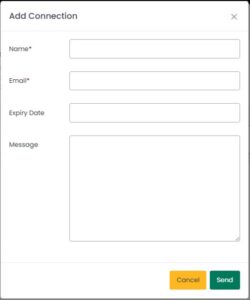
- When logged in click ‘Connections’ then ‘Add Connection’.
- Complete the form including the third parties name and email address
- You can choose which documents you wish to share and for how long
- Once the third party accepts your connection, the status will change from ‘pending’ to ‘active’
- You can remove a connection at any time
Please note: The third party you wish to connect with will also need to create an account and maybe pay a fee for the service.
Please see our Frequently Asked Questions below and FAQs page on the portal for further guidance.
How will I receive my award documents (certificate and transcript)?
You’ll be able to access your certificate and transcript as digital documents through our secure Award and Verification Portal. You will receive an email from certification@northampton.ac.uk when your documents have been published, and you’ll be able to register on the portal. Please do not register before you receive your email. If you try to do this before receiving your email, your registration will fail.
The University no longer automatically provide printed award documents. Your digital certificate and transcript are available through the portal, and printed copies can be ordered via the portal should you wish to receive them (fees will apply).
What is the University of Northampton Award and Verification Portal?
The portal will allow you to view digital copies of your award documents and order any hard copies you require (fees apply). You will also be able to share your e-documents with third parties to verify your award. (Please note: Third parties may be charged a connection fee.) You will be able to access the following documents through your portal:
- e-Certificate
- e-Transcript
Your e-documents can be verified via a QR code in the bottom corner of the e-document to confirm their authenticity.
Is there a charge for the service?
You can initially access your digital documents for free once they have been published however there will be a yearly access fee if you wish to continue with the service. If you wish to share these with a third party, the third party may be charged a connection fee and then be able to access your documents.
If you wish to receive a printed copy of your documents, you can order these through the portal (fees apply).
If you lose your printed documents, you can purchase replacement hard copy documents through the portal for a fee.
What information do I need to register on the Portal?
You will need the following:
- First name. As registered during your time of study.
- Surname. As registered during your time of study
- Your Student ID Number
- Date of Birth (Please use DD/MM/YYYY format or use the calander view to select)
- Personal email address (not your university email address)
If you cannot remember your information, we suggest you enter the details that you can recall, and we’ll be notified to check the data. We may have to contact you for further information to ensure that we are granting access to the correct person.
What email address should I use to register?
Use your personal email address that you are likely to keep for a long period of time. You will need access to the email address if you forget your password and need to reset it. Please do not use your university email address.
I haven’t received the email to confirm my email address for the Portal?
Please check your spam or junk folders, as your email provider may have redirected the message if it did not recognise the sender as safe. If you do not find the confirmation email in those folders, email certification@northampton.ac.uk including your name, date of birth, course and student ID number (if known) in your message.
I have registered but received a message saying that my account must be approved?
During the registration process, your information is compared with the data the University has on file for you. If any part of this does not match, your registration will be reviewed. This process could take up to 10 working days, especially during busy periods. Once your account is approved, you’ll be able to log in using your email address and the password you created.
If you are still unable to access your account 10 working days after registering, please contact certification@northampton.ac.uk including your name, date of birth, course and student ID number (if known) in your message.
There are mandatory fields in the Portal for first name and last name, but I only have one name – what do I do?
To complete your registration for the portal, please enter a dash ‘-’ in the first name field. This will let you complete your registration.
Can I print my certificate on the Award and Verification Portal myself?
No, you are unable to download or print your e-documents, however you can view them at any time and share them with a third party.
If you do decide to print the screen version, this will not be verified and would not pass a verification process. To ensure you have a valid copy, you can use the QR code to confirm authenticity. The QR code will match the details on the certificate to the details in our records system.
If you would like a hard copy of the documents, you will need to order these via your portal (fees will apply).
Can I give employers/other universities/third parties access to verify my award on the Awards and Verification Portal?
Yes – you can create a Connection with third parties (employers, other universities etc) giving them permission to log in and view your qualification and verify its authenticity. Once you have logged in to your portal, on your dashboard you will see a ‘Connections’ tile where you can set-up a connection with a third-party.
You can choose which items to share, and will be asked how long you wish to allow access for. We recommend setting up a connection for a month or less. After this date, third parties will no longer be able to access your information. You are, however, able to extend the date of a connection at any time.
The third party may be charged a connection fee to view your documents. You will be able to remove the connection at any time.
How do I get my documents verified or certified?
There are several ways to verify the authenticity of your qualifications to a third party:
- SmartVerify+ QR Code: You can scan the SmartVerify+ QR code on your award documents with a mobile device to confirm their authenticity. The QR code can be found in the bottom right corner of your documents.
- Third party connection: Allow third parties to log in and view your qualifications for verification via the Award and Verification Portal. For more information on how to do this, read the above question “Can I give employers/other universities/third parties access to verify my award on the Awards and Verification Portal?”
What should I do if I change the email address I have registered for the Award and Verification Portal with?
Please remember to update it in the personal details section of your portal before you close your old email.
Will updating contact details on the Award and Verification Portal automatically update my details with the University?
No – This will only update your details on your Award and Verification Portal. If you wish to update your details with the University you can do this via your SITS Student Portal or by contacting sid@northampton.ac.uk.
I still need help using the Award and Verification Portal – who do I contact?
Please contact the Assessment and Certification team at certification@northampton.ac.uk providing your name, date of birth, course and student ID number (if known).
Requesting your certificate and transcript
– for students awarded prior to 22 July 2026
You can request your certification documents by completing the online certificate claim form. We send out batches of certificates and transcripts approximately every two weeks. Completion of the online certificate claim form will ensure that your request is added to our system. All certificates and transcripts are sent by Royal Mail Second Class post to UK addresses. All overseas mail is sent by DHL.
Lost Award Documents
If your documents have been lost in the post and the address provided was correct we can provide one free of charge replacement provided you claim this within one year of the original postage date. Please email certification@northampton.ac.uk for all lost document enquiries. Please note we will have to wait two months from the dispatch date to ensure the documents are not delayed and are truly lost.
If your documents have been lost due to an incorrect address or it is over one year since the original postage date you will need to purchase replacement documents.
How can I check how my name will appear on my certificate or transcript?
It is your responsibility to ensure that your name is correct on your student record prior to your results being processed at an award and status board. If you would like to check this at any time prior to being awarded, please email SID@northampton.ac.uk.
After your award has been officially conferred it is no longer possible to change your name. The formal conferment record holds your name as it appeared on your student record and any changes could result in your award becoming unverifiable.
If you believe that there is an error on your certificate and/or transcript please email certification@northampton.ac.uk with a copy of your passport which was current at the time you enrolled on your course. We will only be able to complete an official name change in exceptional circumstances (Word 40KB). Please note any post-award name change requests for omitted names MUST be received within one year of you receiving your documents.